Red Gradient Side-Print Shine-Through PBT Keycaps Guide
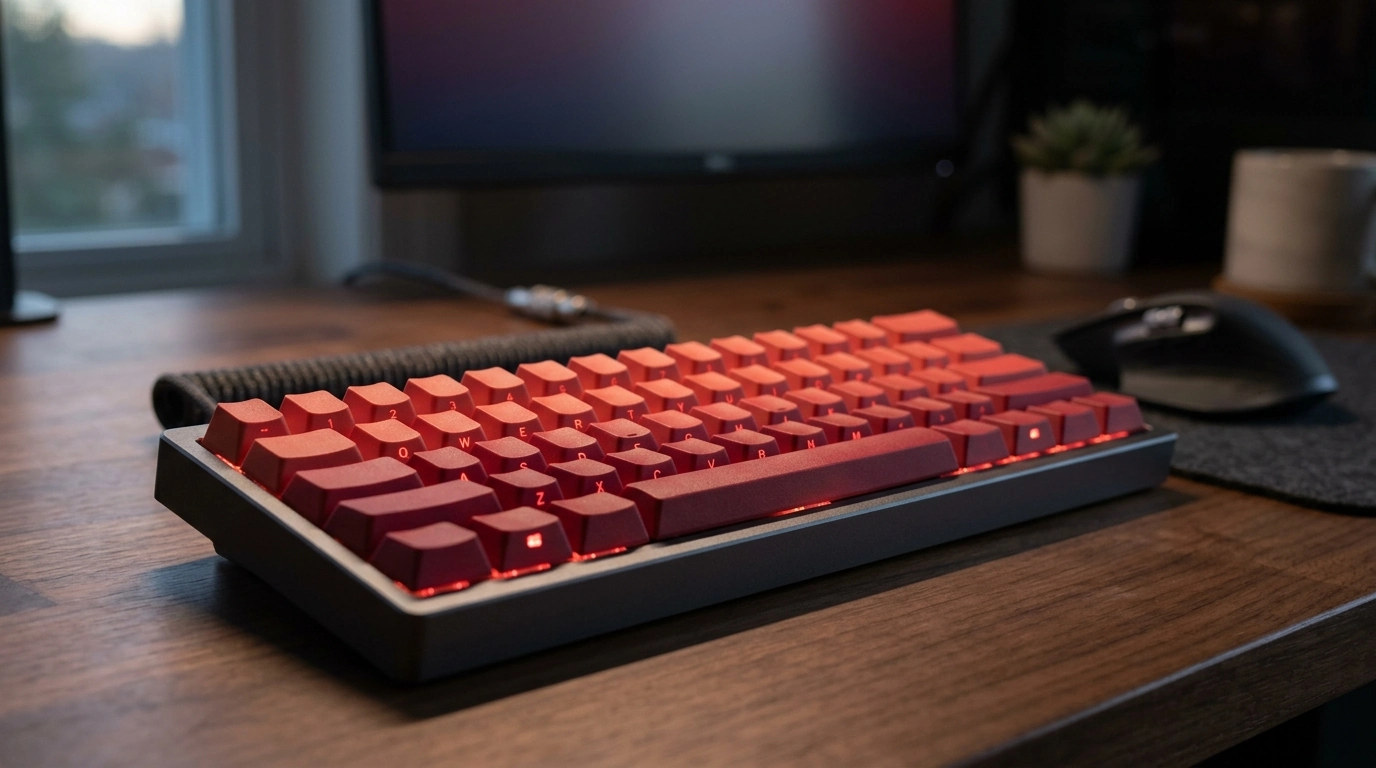
Red Gradient Side-Printed Shine-Through PBT Keycaps (Cherry Profile): Build, Fit, and Backlight Results
A red gradient set with side-printed legends and shine-through cutouts changes both the look and nighttime readability of a mechanical keyboard. This guide breaks down what to expect from Cherry-profile PBT keycaps—feel, sound, fitment, and lighting—plus quick checks to make sure the set matches the keyboard layout and switch type before buying. For more guidance, see Side Print Pbt Cherry Black 136 Key ….
What makes this keycap set different
This style of set is designed to look clean in daylight and stay functional after dark. Instead of placing legends on the top surface, the text sits on the front/side face, and the lighted portion is built to glow through those legend windows. For further reading, see Cherry Mx Red Keycap 115 Keys Red Transparent Clear ….
- Gradient colorway: a red fade intended to transition smoothly across rows, giving a more “built” look than many single-tone sets.
- Side-printed legends: keeps the top surface minimalist and reduces visual clutter, especially on compact boards.
- Shine-through effect: translucent legend areas let per-key LEDs pass through for easier low-light reading.
- PBT material: typically resists developing a slick, glossy sheen from finger oils longer than many ABS options.
- Cherry profile: a sculpted, lower profile many users pick for comfort and a less “tall” feel than common OEM sets.
Material and printing: durability and long-term appearance
PBT is often chosen for its day-to-day practicality. It tends to feel slightly more textured and can maintain that texture longer, which matters on frequently used keys like WASD, Enter, and Space.
- Stiffness and sound: PBT keycaps are generally stiffer; combined with wall thickness and your keyboard case, that can translate to a slightly deeper, more solid sound.
- Wear visibility: because the top surface is unprinted, normal abrasion doesn’t “erase” the main visible area the way it can on top-printed caps.
- Lighting consistency: shine-through depends on clean cutouts/translucent sections; uneven translucency can look patchy on high-use keys.
- Quality cues: crisp legend edges and consistent diffusion usually produce a more uniform glow across modifiers and gaming clusters.
For general background on PBT as a material, see Polybutylene terephthalate (PBT).
Profile and typing feel: what Cherry profile changes
Cherry profile is sculpted by row, meaning each row has a slightly different height and angle. This shaping helps fingers settle naturally while moving between the number row, home row, and modifiers.
- Row sculpting: different key heights/angles can improve comfort during long sessions by reducing awkward reaches.
- Perceived speed: compared with taller profiles, Cherry can reduce finger travel a bit and may feel quicker for gaming and touch typing.
- Pitch shift: many boards sound a touch lower with Cherry caps than with taller sets, especially when the case is dampened.
- Adjustment period: moving from OEM, the number row and long modifiers often feel the most different due to sculpt and height changes.
Compatibility checklist: switches, layouts, and stabilizers
Most fit issues come from layout details rather than the alphas. A quick check before ordering prevents the classic problems: wrong spacebar size, missing right Shift options, or a mismatched Enter key.
- Switch stems: confirm MX-style “+” stems (common on Cherry MX and most MX-compatible switches). Cherry’s overview of the family is a helpful reference: Cherry MX switch family.
- Keyboard layout: verify bottom-row sizing (6.25u vs 7u spacebar) and modifier widths that match your board.
- Enter and left Shift: ANSI and ISO use different shapes; make sure the set supports your layout.
- Stabilized keys: Spacebar, Enter, Backspace, and Shifts rely on stabilizers; most modern boards use Cherry-style stabilizers, but it’s worth confirming.
- Backlight alignment: north-facing vs south-facing LEDs can change how side-printed shine-through looks, especially on sculpted rows.
| What to check | Why it matters | What to look for |
|---|---|---|
| Stem type | Ensures the keycap mounts on the switch | MX-style “+” stem compatibility |
| Layout (ANSI/ISO) | Prevents missing or mismatched keys | Correct Enter, left Shift, and extra keys if needed |
| Bottom row | Avoids spacebar/modifier sizing issues | Correct spacebar unit size and matching modifiers |
| Stabilizers | Large keys wobble or bind if mismatched | Cherry-style stabilizer support (most common) |
| LED orientation | Changes brightness and readability | Even glow through side legends on frequently used keys |
Backlight results: what “shine-through” looks like in real use
For general context on keyboard design and terminology, see Mechanical keyboard.
Who this set is best for
Care tips to keep the gradient and legends looking clean
Product snapshot and buying notes
- Name: Red Gradient Side-Printed Shine Through Keycaps Cherry Profile PBT
- Availability: in stock (stock can change)
- Price: $46.51 USD
- Best results: MX-style mechanical keyboard with per-key backlighting
- Before checkout: confirm ANSI vs ISO and bottom-row sizing to avoid missing keys
More in-stock picks
- 120W Fast Charging Power Bank 50000mAh for Samsung (in stock)
- 20W Portable Bluetooth Speaker (in stock)
- Step-by-Step Career Development Guide – Professional Growth, Job Search, Networking & Resume Writing Ebook (in stock)
FAQ
Will these keycaps fit my mechanical keyboard?
Check for MX-style “+” switch stems first, then confirm your keyboard layout (ANSI vs ISO) and bottom-row sizes. For large keys, verify your stabilizers are compatible (most boards use Cherry-style stabilizers).
Do side-printed shine-through legends work with any backlight orientation?
They work with both north- and south-facing LEDs, but brightness and readability can change based on LED position, diffuser strength, and where the translucent legend window sits on the keycap.
Does PBT prevent keycaps from getting shiny over time?
PBT usually resists turning glossy longer than many ABS sets, so the texture tends to last. Oils and wear can still alter the finish over extended use, especially on frequently pressed keys.






Leave a comment